- Published on
Animations, Animations, Animations
(I would've put a gif here of Steve Ballmer going "Developers, developers, developers!", but I couldn't find it within a couple minutes, so you'll just have to imagine it while replacing the word "developers" with "animations")
Table of Contents
Current State
Before we get to that, though, it needs to be said that progress has been made since last time. We now have temporary invulnerability when Tomato Man gets damaged, a death state (not only for Tomato Man, but also for the carrot enemy and the new mushroom enemy), and the ability to attack the enemies. There's also been one or two releases to GameJolt since the last article.
Now, of course I couldn't stop there. The game now also has a nice, 4-layer parallax-scrolling background, and a lot of new graphics. You'll notice some new screenshots on the project page showcasing these, plus a fancy end-level screen, courtesy of Claude Code (who also did the game over screen). The level has even been expanded a bit, to showcase the new background and slide ability.
As per yuzh1, if you're interested in seeing the latest progress, you're always welcome to check it out for free over here.
Animations
Now, as we were. So, animations have sort of been a thing for this project, as one can imagine when building a platformer. The main character has a handful of animations implemented (jump, run, attack, damage, etc.), and there are still a handful left to add, mainly all involving the ability to pick up and throw boxes.
Back in the day, when I was a young lad in 20232 I was doing a lot of tutorials.3 One thing that I saw in those that covered animations, was that they often used what's called an AnimationNodeStateMachine as the root node of the AnimationTree node.4 Much like what's pictured below:

After reading the documentation regarding animations, particularly this one, I learned that this is extremely useful... For 3d. There's some powerful and clever-looking stuff that makes 3d animations look very nice when using an AnimationNodeStateMachine. For our use case, it'll work, and you can even do this:
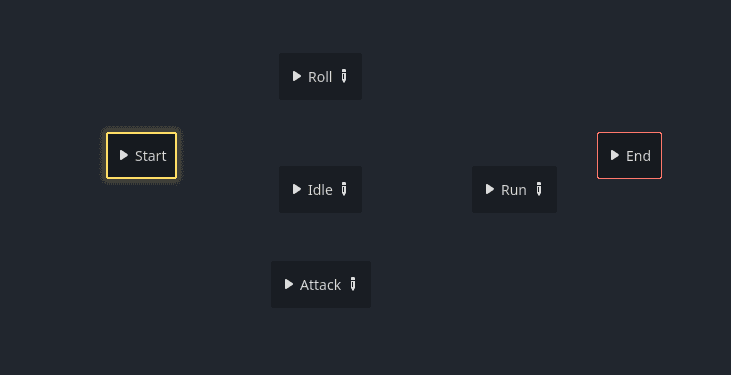
and it'll still work just fine. The aforementioned documentation explains how this works, which makes it make sense. For the above project, each of those nodes in the state machine is an AnimationNodeBlendSpace2D, which allows you to play animations based on two axes. So, you'd pass in x and y values, and the engine will play the closest animation. Something like this:
$AnimationTree.get("parameters/playback").travel("Jump")
$AnimationTree.set("parameters/Jump/blend_position", jumpVector)
You tell the state machine to 'travel' to the desired state, then you set its blend position to tell it what animation to play. As a side note, you can also use AnimationNodeBlendSpace1D for when you only need one axis.
Now here's the kicker: What happens when you need a state that applies regardless of the current action/state? Let's say you have a temporary invulnerability state that lasts for a few seconds after taking damage. How might you do this? Strictly in code? I'm sure this could be made to work, but I found what I believe to be a better way:
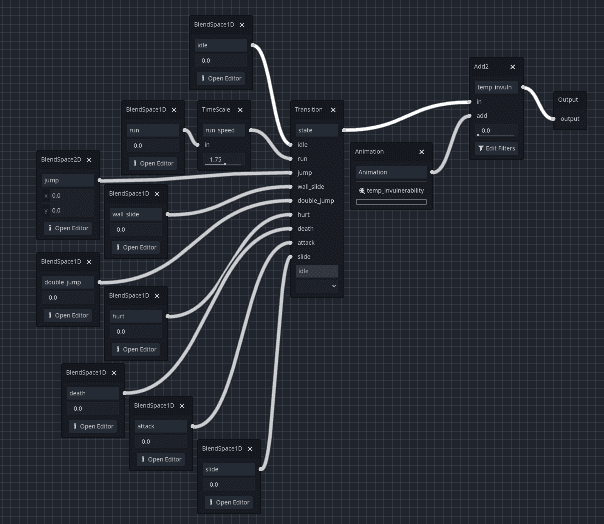
A blend tree! Or, more technically, an AnimationNodeBlendTree.
Here it is a little closer:
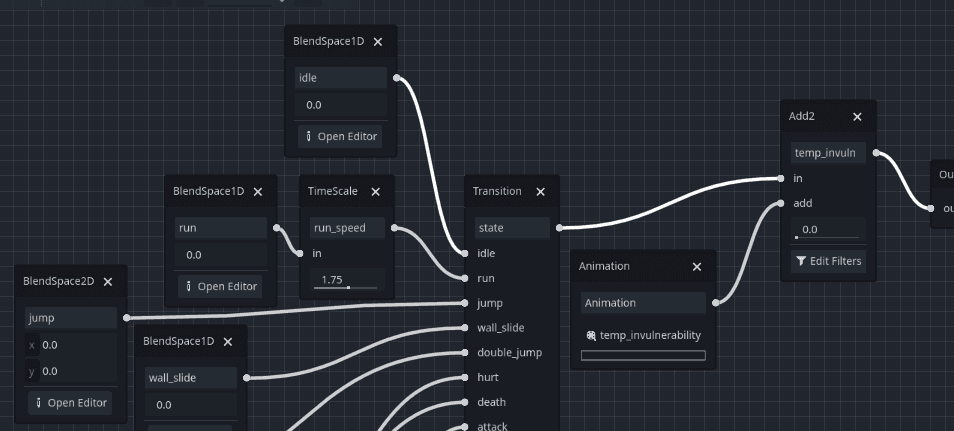
You can see the same types of nodes that are used with the state machine: BlendSpace1D, BlendSpace2D, etc. and they work exactly the same way. The real difference here is that instead of telling a state machine to travel to states, you set a 'transition request' parameter on the Transition node (which I called 'state' here) and then set the blend position like before.
parent.animation_tree.set("parameters/state/transition_request", "jump")
parent.animation_tree.set("parameters/jump/blend_position", parent.jumpVector)
Notice how with this strategy, you can use an Add2 for a temporary invulnerability state, as you can see just before the output node way on the right. Any number of 'global' states can be added in this way, and they'll all be applied regardless of what state is selected in the AnimationNodeTransition (named "Transition" in the image above). Simply set their add_amount value like so:
# to deactivate, simply set to 0.0 instead
animation_tree.set("parameters/temp_invuln/add_amount", 1.0)
And there you have it. A more sensible way to implement animations and allow for global, optional states. Now, in the interest of full disclosure, I'm sure that a Godot animation expert could see this and see a million things wrong with it, and that's great. If a better way ever becomes known to me, I'll be happy to give it a try and then maybe write about it, but until that day comes, I think this is just fine, and can probably take you pretty far. Enjoy!
Until next time!
Footnotes
Just discovered an amusing write-up on this, so I'm going to start trying to use this phrase more often on this blog. ↩
I'm being facetious here, to be clear. ↩
Now, when I say "a lot of tutorials", what I'm really saying is "WAY too many tutorials. As in, probably 10x more than I should have. As a matter of fact, I carry great shame for the innumerable, obnoxious, unspeakable amount of tutorials that I did back then." ↩
I will not be explaining Godot concepts at a beginner level here. I want to keep this blog aimed more at intermediate or above since there are countless resources for getting started. If you're brand new to this engine, I highly recommend checking out maybe ONE or TWO tutorials (and no more!), and then building a thing or two from scratch without any tutorial hand-holding. This particular article assumes at least some exposure to Godot's animation features. ↩